The File Structure for My AI-Maintained Second Brain
Covers July 2026 · published August 2026
Last time I covered locking down remote access and the phone-side failures that came with it. This time: designing the vault itself. People picture a “second brain” as something elaborate — nested tags, custom plugins, a taxonomy years in the making. Five folders is all it took.
That’s the whole point of this piece. The structure is small on purpose, and the one part of it I tried to maintain by hand is the one part that broke.
The design came before the hardware
This structure wasn’t something I grew into after months of trial and error. It was written into the very first message of the entire project, before any hardware was even ordered. One distinction to hold onto through the rest of this, because I blur it if I’m not careful: the folders were settled up front and haven’t moved since. The practices around them were not, and the one worth writing about — covered further down — I got wrong first and only fixed after watching it fail.
Five folders, built on the “LLM Wiki” idea — letting an AI act as the backend maintainer of a knowledge base instead of a chat window you paste into. I picked it up from a post by @polydao, which built on an earlier one by Yarchi; both point back to Andrej Karpathy’s writing on the approach. The design came first, on paper, adapted from something that already existed.
The vault itself lives in Obsidian — a free note-taking app that stores everything as plain text files on your own machine, linked together the way a wiki links pages. No cloud lock-in, no proprietary format. That’s what makes it a good fit for an AI to maintain directly: it’s just files and folders, the same way a person would organize them.
Five folders
- 00-Raw — unprocessed material, exactly as captured, before anything’s been organized
- 01-Notes — atomic notes: one clear idea per note, nothing bundled together
- 02-MOCs — Maps of Content: topic hubs that link out to everything related to that subject
- 03-Resources — reference material, checklists, workflow docs, system instructions
- 99-Archive — completed or superseded material, kept for history, out of the active working set
Plus one file outside all of them: Inbox.md, a temporary landing spot for whatever gets captured raw before it’s been sorted.
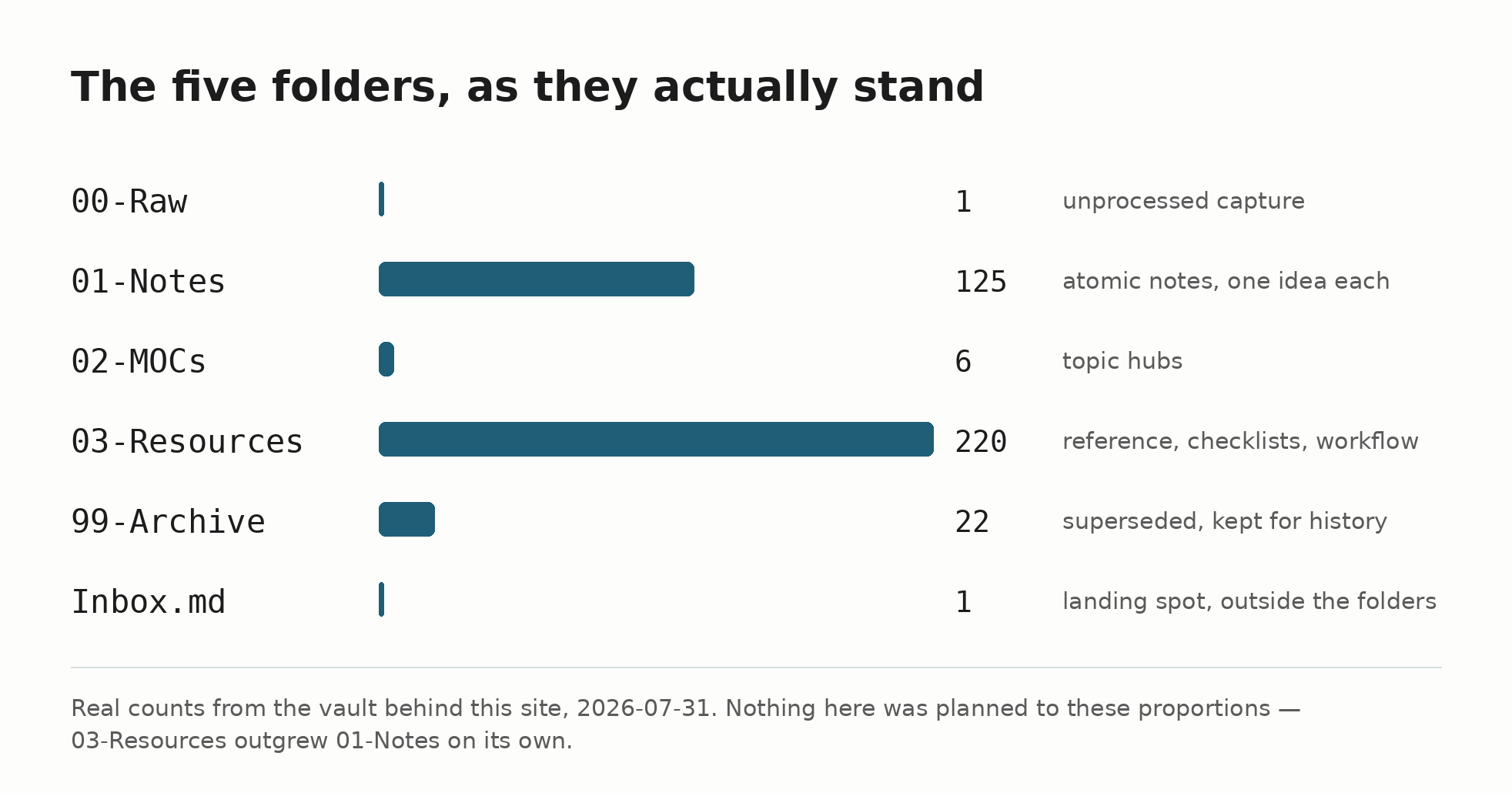
Those are the real counts as I write this, not a tidy illustration of what the structure is supposed to look like. Nothing planned those proportions. I would have guessed 01-Notes was the biggest folder by a wide margin; 03-Resources quietly outgrew it, because checklists and workflow docs turned out to be what this system actually produces most of. The structure didn’t have to change to absorb that. It just filled up unevenly, which is the point.
Why atomic notes, specifically
One idea per note is what actually makes an AI maintainer work. It’s not just a minor stylistic choice. A note that bundles five ideas together is hard for anything, human or AI, to link precisely. A note with exactly one idea can be linked precisely, updated in isolation, and found by search without ambiguity. The wikilinks between atomic notes are what let a Map of Content stay a genuinely useful index instead of a wall of text.
The MOC lesson that only showed up with real use
Early on, I had a note that hand-listed every active note and MOC in the vault — a table of contents, basically. It went stale almost immediately. Nobody, human or AI, kept it updated as the vault grew, because updating it wasn’t anyone’s actual job.
The fix wasn’t a better list. It was giving up on a static list entirely.
Point instead at things that are self-maintaining by nature. Browse the MOC folder directly for active topic hubs. Check a running session log for what’s actually in flight. Check the vault’s own dated state snapshots for where things stand.
A structure that has to be manually kept in sync with reality will fall out of sync. A structure that reads reality directly can’t. The folders never had that problem, because nothing about them had to be maintained by hand in the first place.
Worth being precise, because a session log and a state snapshot are obviously written by somebody. The distinction isn’t hand-written versus automatic — it’s append-only versus kept-in-sync. A session log only ever grows; a dated snapshot is true of the day it names and never claims to be true of today. Neither can drift, because neither is making a promise about the present. The master index was making exactly that promise, to every note in the vault at once, and it broke the first time a note moved. That’s the failure mode to design out — not manual effort, but any artifact that has to be corrected rather than simply added to.
The logic works, so let it
I didn’t invent any of this. I borrowed the outline, adapted it, and let the AI do the rest. It works.
It has just enough structure to know where new material provisionally goes: raw capture, atomic notes, topic hubs, reference, archive. The actual topic hubs — the MOCs — emerge from real material, not from a plan of what topics you expect to have someday.
Mine has grown to six MOCs so far. All earned by real, accumulated content, not created in advance to look complete.
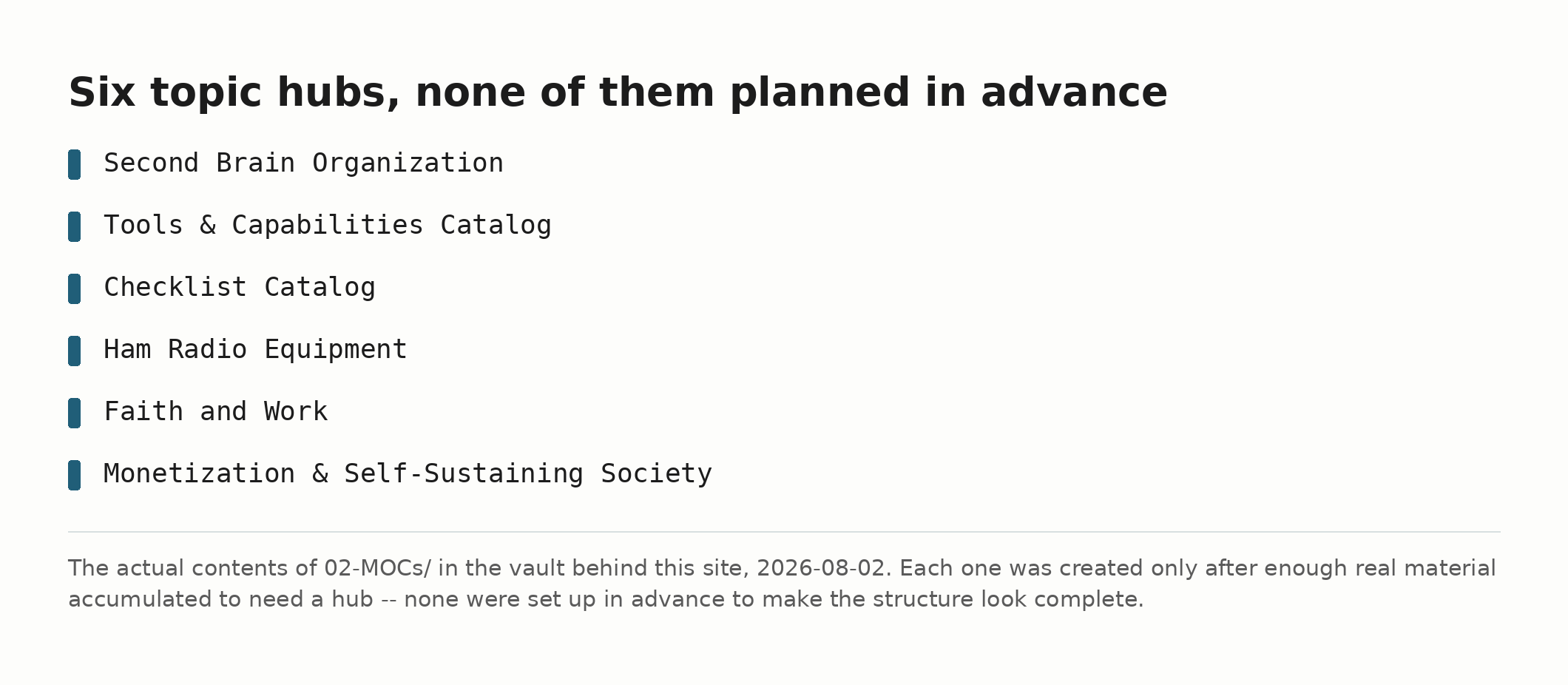
There doesn’t seem to be any reason to get fancy with this. Keep it simple.
Try this right now
Open whatever notes app you already use and count how many of your folders exist because you actually put things in them, versus how many you created because they seemed like a good idea. The second group is the one worth deleting.
What comes next
Part 5 goes deeper on the guardrails file itself — not just the headline rules already covered in Part 1, but how that file actually accumulates rules from real incidents over time, and the handful of operating principles that grew out of them.
If this helps you, check out my adblob to support the work.